You copy a page’s address from the browser bar and paste it into a chat. Instead of example.com/café latte you get example.com/caf%C3%A9%20latte. It looks like a mistake, but it’s exactly how it should be.
Those codes with a percent sign are URL encoding: the way web addresses write the characters they can’t contain, like spaces and accented letters. If you build links, forms or pages, sooner or later you’ll need it.
In this guide I explain what %20 and %C3%A8 mean, which characters must be encoded and how to do it right, with a conversion table and an encoder you can try right away.
What is URL encoding?
A web address can only contain a small set of characters: English letters, digits and a few symbols. Everything else has to be written another way: a % sign followed by two hexadecimal digits, which stand for one byte.
A space, for example, is byte 20 in hexadecimal, so it becomes %20. That’s why URL encoding is also called percent-encoding.
Why some characters must be encoded
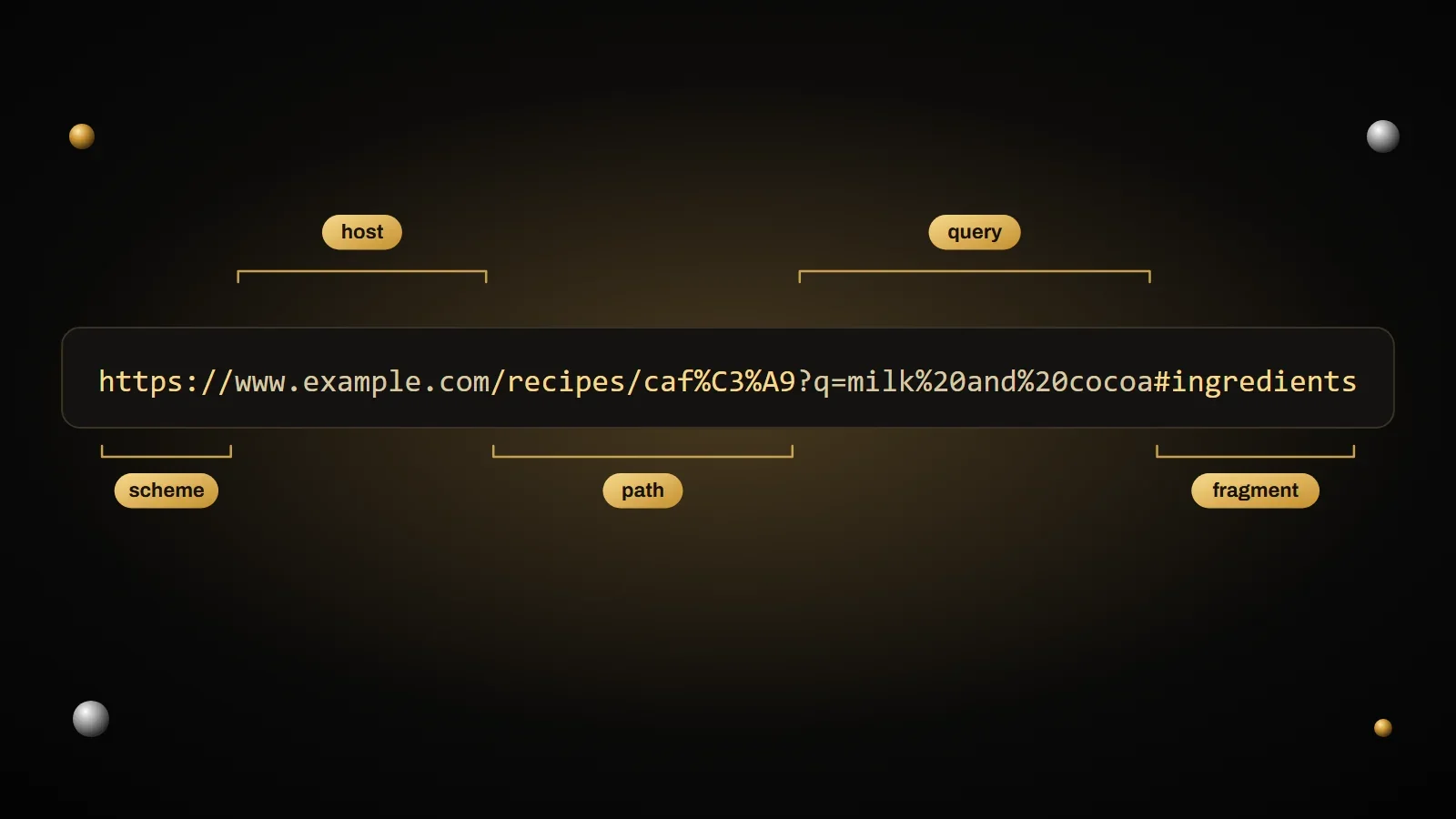
Some symbols in addresses have a specific job. The ? starts the query, the & separates parameters, the = splits a name from its value, the # points to a spot on the page and the / separates the folders of the path.
Imagine searching for “salt & pepper” on a website. If the address were /search?q=salt & pepper, the server would read the & as the start of a new parameter and search only for “salt”. Encoded as %26, the & goes back to being a plain character of the text.
The rules are set by the RFC 3986 standard, and they split characters into three groups:
- Never encoded: the letters A to Z, upper- and lowercase, the digits 0 to 9 and the four symbols
-._~. - Reserved:
: / ? # [ ] @ ! $ & ' ( ) * + , ; =. They’re encoded when you use them as text, for example inside a parameter value. - Everything else, including spaces, quotes and accented letters: always encoded.
What %C3%A8 means: accented letters
A space takes a single byte, so a single code. Accented letters don’t: first they’re turned into their UTF-8 bytes, and then each byte becomes a percent code.
In UTF-8 the letter “è” is made of two bytes, C3 and A8, as you saw in the guide to ASCII, Unicode and UTF-8. In an address it therefore becomes %C3%A8, and the Italian word “caffè” becomes caff%C3%A8.
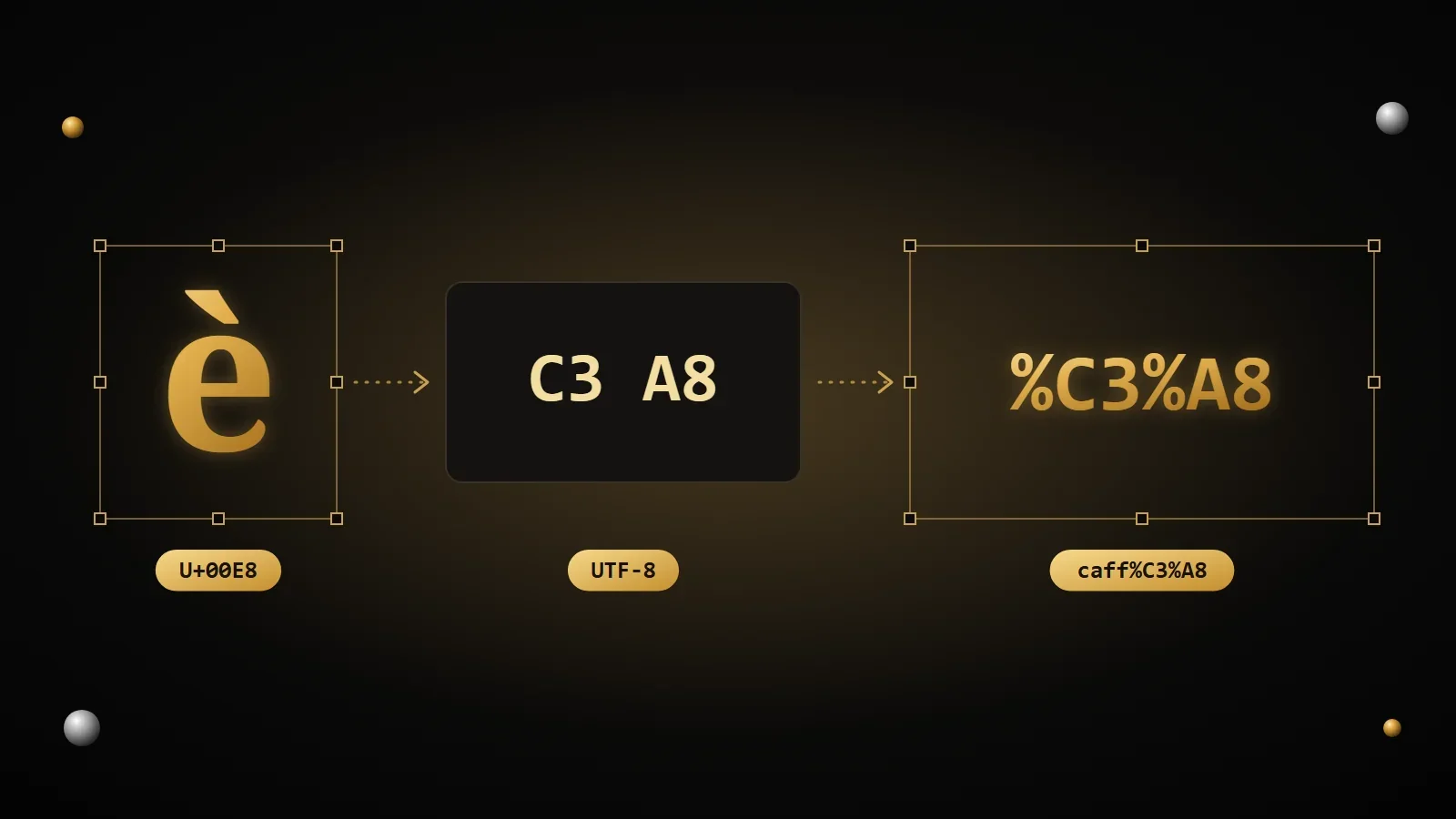
Your browser runs the process backwards for convenience: the address bar often shows you “café”, but when you copy the link, or when it sends it to the server, it uses the encoded version.
Conversion table
Here are the characters you’ll encode most often. Upper- or lowercase hex digits make no difference, but the standard recommends uppercase.
| Character | Encoded | Why it’s encoded |
|---|---|---|
| space | %20 | Addresses can’t contain spaces (in forms it becomes +) |
" | %22 | Not allowed |
# | %23 | Points to a spot on the page |
% | %25 | Starts every code |
& | %26 | Separates parameters |
+ | %2B | Means a space in forms |
/ | %2F | Separates the folders of the path |
: | %3A | Separates the scheme and the port |
= | %3D | Splits a parameter’s name and value |
? | %3F | Starts the query |
@ | %40 | Separates user name and host |
| à | %C3%A0 | Two bytes in UTF-8 |
| è | %C3%A8 | Two bytes in UTF-8 |
| é | %C3%A9 | Two bytes in UTF-8 |
| ñ | %C3%B1 | Two bytes in UTF-8 |
| ü | %C3%BC | Two bytes in UTF-8 |
| € | %E2%82%AC | Three bytes in UTF-8 |
%20 or +: how to write a space
You’ll see spaces written in two ways. It isn’t a mistake: they’re two different rules.
%20is the standard encoding for addresses, and it works everywhere, including the path.+is only used in parameters sent by a form, like a site’s search box. It’s a convention of HTML forms.
Warning
A + only becomes a space in form parameters. In the path of an address it stays a real +. And if you actually need a plus sign in a form value, write it as %2B, otherwise whoever receives it will read it as a space.
How to encode a link correctly
There’s no need to encode by hand: every language has its own functions. What matters is picking the right one, and encoding the individual values, not the whole address once it’s built.
In JavaScript
const value = "salt & pepper";

// for a single value: also encodes & = ? / #
console.log(encodeURIComponent(value));
// salt%20%26%20pepper

// the easiest way: let the URL object do it
const address = new URL("https://www.example.com/search");
address.searchParams.set("q", value);
console.log(address.href);
// https://www.example.com/search?q=salt+%26+pepper
There’s also encodeURI, which encodes a whole address but leaves symbols like & and ? alone. That’s exactly why it mustn’t be used on single values: an & in the text would stay an &, and break the parameters.
In Python
from urllib.parse import quote, urlencode

print(quote("café latte"))
# caf%C3%A9%20latte

print(urlencode({"q": "salt & pepper", "page": 2}))
# q=salt+%26+pepper&page=2
In PHP
<?php
echo rawurlencode('salt & pepper');  // salt%20%26%20pepper
echo urlencode('salt & pepper');     // salt+%26+pepper
In PHP rawurlencode follows the address standard and writes a space as %20, while urlencode follows the form rule and writes it as +.
Try the URL encoder
Type a value to see how it looks in a link, or paste an address full of percent codes to read it in plain text. You can also pick the form rule, with + instead of spaces.
URL encoder and decoder
Type a value to encode it for a link, or paste an encoded address to read it. Form data turns spaces into +, the other modes into %20.
The most common mistakes
- Encoding twice. If you encode text that’s already encoded, the
%becomes%25: a space goes from%20to%2520. If you see%25in a link, that’s almost always why. - Using encodeURI on values. It leaves
&,=and?untouched, so a value that contains them breaks the address. For values, useencodeURIComponent. - Forgetting to encode the
&. “Rock & Roll” in a parameter, without encoding, turns into two parameters. - Decoding with the wrong rule. If a value comes from a form,
+is a space; if it comes from the path, it’s a plus. Use the function that matches how it was encoded.
Frequently asked questions
What does %20 mean in a link?
It’s a space. Web addresses can’t contain spaces, so every space is written as %20, its hexadecimal code preceded by a percent sign.
What does %C3%A9 mean?
It’s the letter “é”. In UTF-8 the “é” takes two bytes, C3 and A9, and in addresses each byte is written with a percent sign in front.
Why do I see accented letters in the browser, but not when I copy the link?
For convenience, many browsers show the decoded address, which is easier to read. But the real address, the one that’s sent and copied, is always the encoded one.
Can a web address contain accented letters?
In the path and the query, yes, as long as they’re encoded. Domain names can have accented letters too, but they use a different system, called Punycode, which turns them into names starting with xn--.
What’s the difference between encodeURI and encodeURIComponent?
encodeURI is for a whole address and leaves alone the symbols that give it structure. encodeURIComponent is for a single value and also encodes &, =, ?, / and #.
What does %2520 mean?
It’s a space encoded twice. The first pass turned the space into %20, the second one encoded the % too, which became %25. It should be encoded only once.
Sources and further reading
- RFC 3986: reserved and unreserved characters
- WHATWG: the URL Standard
- MDN Web Docs: encodeURIComponent
- MDN Web Docs: URLSearchParams
- Python documentation: urllib.parse
- PHP manual: rawurlencode
This article wraps up the “Symbols and Characters on the Web” series. You started from an SVG file and ended up with the bytes of a web address: icons, HTML entities, escape sequences, Unicode and URL encoding are all different ways of solving the same problem, telling the computer which character you really mean. If you’d like to go over it again from the start, the series begins with the guide to SVG files.
Comments
No comments yet. Leave the first one!
Leave a comment