
You open an email, a file or a web page and, instead of “café”, you read “café”. Instead of “naïve”, a strange “naïve”. The text looks broken, but it isn’t: every letter is still there, intact.
What happened is a misunderstanding. Whoever wrote the text and whoever reads it are using two different “dictionaries” to turn numbers into letters. Understanding how ASCII, Unicode and UTF-8 work is the easiest way to never see these characters again, and to fix them when they show up.
In this guide I’ll explain it all without formulas: what they are, how they work together and what to check, step by step, to get rid of garbled characters. With an inspector that shows you the bytes of any text.
The problem in a nutshell: computers only know numbers
A computer has no idea what a letter is. It only stores numbers, and to display text it uses a table that says “number 65 is A, 66 is B”. That table is called an encoding.
As long as the writer and the reader use the same table, everything works. If the tables differ, the same numbers become different letters. That’s the reason behind almost every weird character you see.
ASCII: the first table
In 1963 came ASCII, the table that was the foundation of everything for decades. It holds 128 characters: the English upper- and lowercase letters, the digits, punctuation and a few invisible commands, like the line break.
| Character | Decimal number | Hexadecimal |
|---|---|---|
| Space | 32 | 20 |
0 | 48 | 30 |
A | 65 | 41 |
a | 97 | 61 |
The limit is obvious: no “é”, no “ñ”, no “€”. ASCII was enough for English, not for the rest of the world.
The chaos of local tables
To add accented letters, every region of the world created its own extended table, with 256 characters instead of 128. Western Europe mostly used ISO 8859-1, also called Latin-1, and its Windows variant, Windows-1252.
The problem was that each table used the same numbers for different letters. The same byte could be an “é” in France and a Greek letter in Greece. A file written with one table and read with another became unreadable.
Unicode: one number for every character
Unicode was born to end the chaos: a single table for every character in every language. Today it holds more than 150,000 characters, from Latin letters to Chinese ideograms, from math symbols to emoji, and it has room for over a million.
Every character has its own number, called a code point, written like this: U+00E9. The number after U+ is hexadecimal. It’s the same number you met in HTML entities as é and in escape sequences as \u00E9: the way you write it changes, the number doesn’t.
Note
Unicode is a list: it says which number each character has. It doesn’t say how that number should be stored in a file. For that you need an encoding, and that’s where UTF-8 comes in.
UTF-8: how the numbers become bytes
A byte can only hold the numbers from 0 to 255, while Unicode goes beyond a million. UTF-8 solves this elegantly: it uses 1 to 4 bytes, depending on the character.
- 1 byte for the 128 ASCII characters. English text saved as UTF-8 is identical to the same text in ASCII.
- 2 bytes for European accented letters, like “é”, and for Greek, Cyrillic, Hebrew and Arabic characters.
- 3 bytes for almost everything else, including the “€” sign and ideograms.
- 4 bytes for most emoji and the rarest characters.
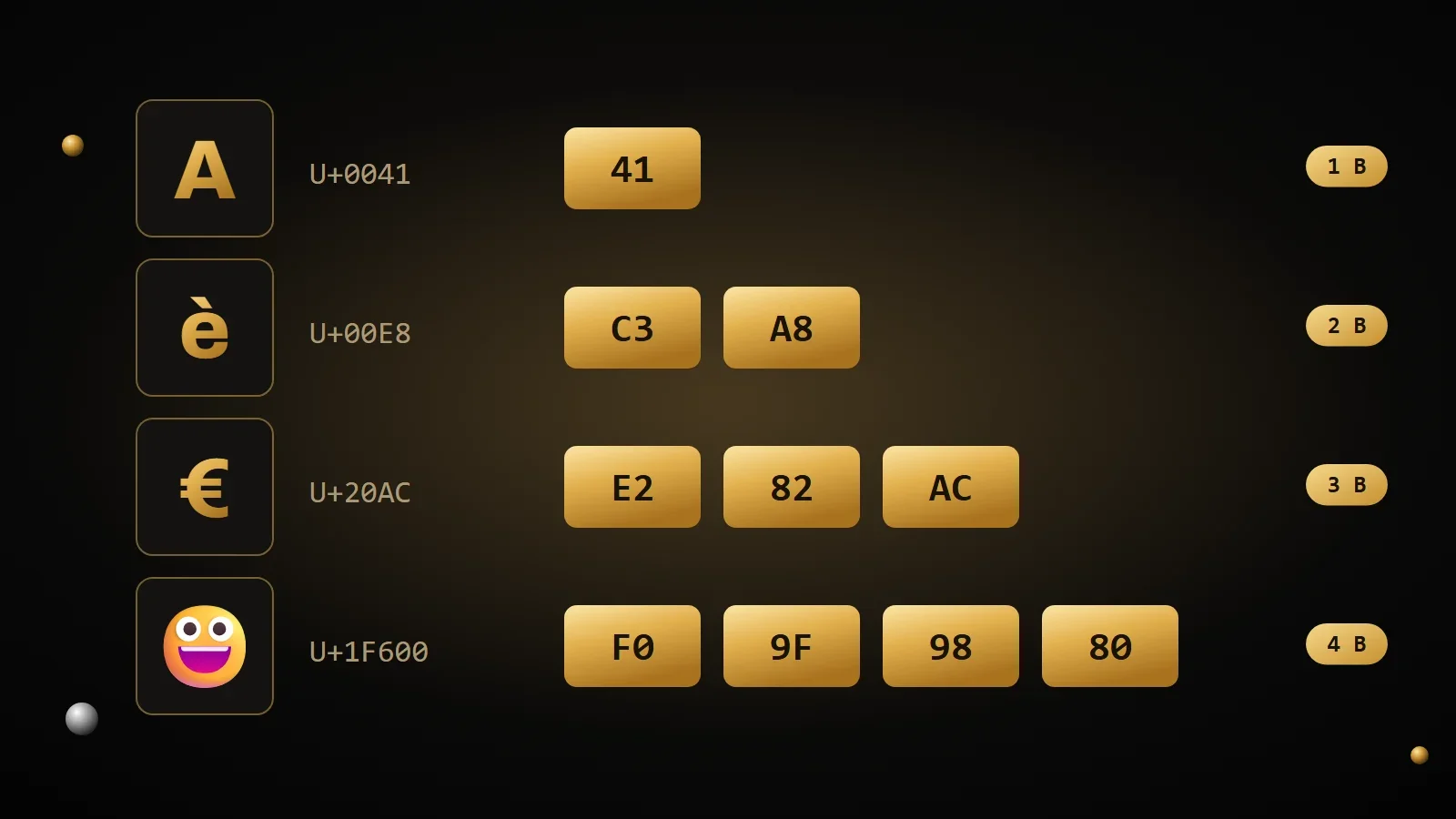
That’s why UTF-8 won: it’s compatible with ASCII, doesn’t waste space and can write any character. As of October 2026, it’s used by 99.1% of the websites whose encoding is known, according to W3Techs.
Why an emoji “counts” as two characters
Try it in JavaScript: "😀".length returns 2, not 1. JavaScript stores text as UTF-16, another Unicode encoding that uses 2-byte units, and an emoji takes two of them. To count characters the way a person sees them, use [..."😀"].length, which returns 1.
Why “é” turns into “é”
Now you have all the pieces. In UTF-8, “é” takes two bytes: C3 and A9. If a program reads those bytes thinking the text is Windows-1252, it turns them into two separate characters: C3 is “Ô and A9 is “©”. The same happens to “è”, whose bytes C3 A8 become “è”.
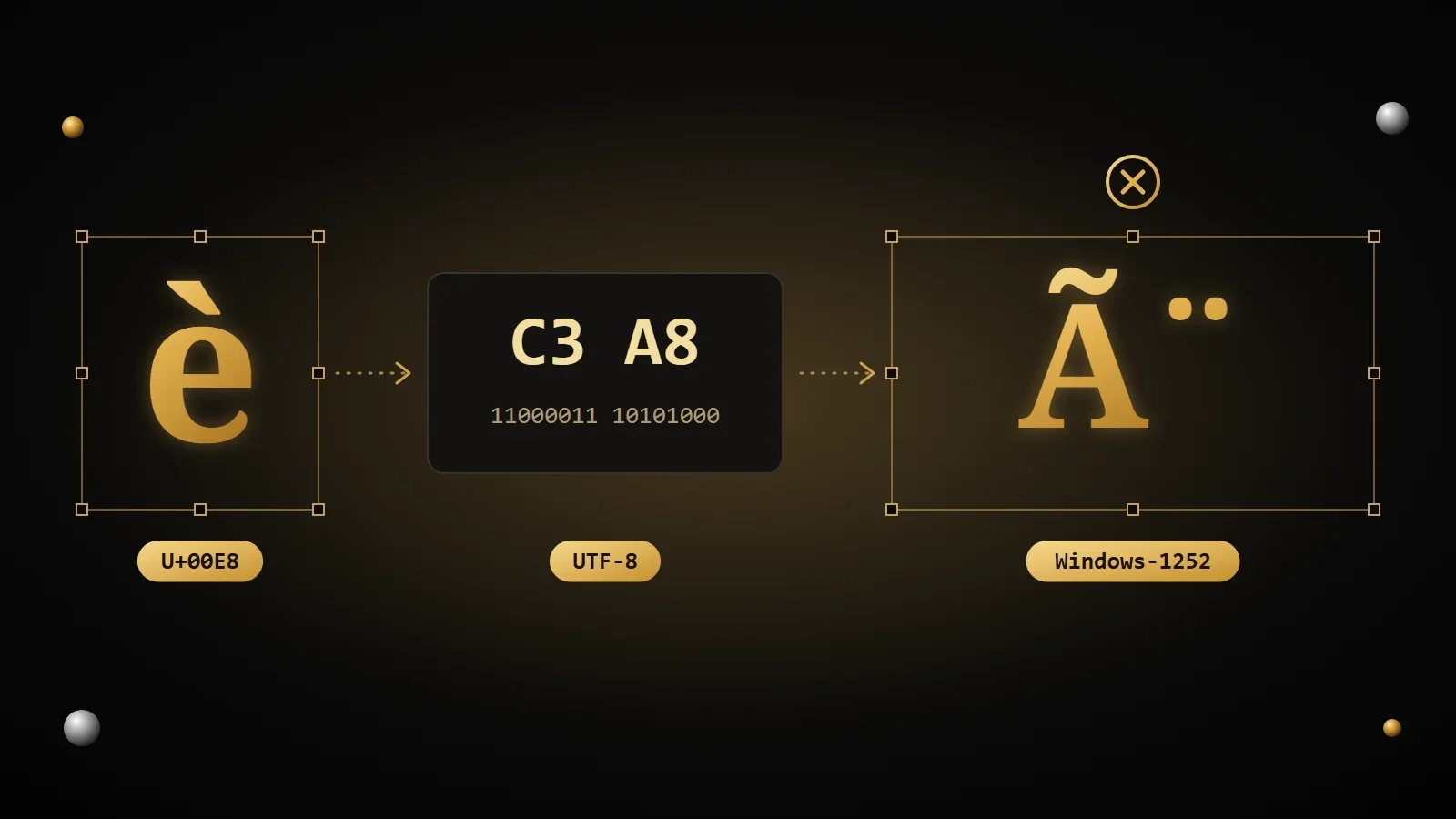
This mistake even has a name: mojibake, a Japanese word for exactly these garbled characters. Here are the ones you’ll meet most often. If you recognize them, you already know what happened: UTF-8 text read as Windows-1252.
| You should see | UTF-8 bytes | You see instead |
|---|---|---|
| é | C3 A9 | é |
| è | C3 A8 | è |
| à | C3 A0 | Ã followed by an invisible space |
| ö | C3 B6 | ö |
| € | E2 82 AC | € |
| ’ (typographic apostrophe) | E2 80 99 | ’ |
| “ (opening quote) | E2 80 9C | “ |
It happens the other way around too. If text saved as Windows-1252 is read as UTF-8, accented letters become “�”, a diamond with a question mark: it’s the character a program uses when it finds bytes that make no sense in UTF-8.
Try the character inspector
Type or paste any text: you’ll see the Unicode number of every character, its UTF-8 bytes and what it would turn into if it were read by mistake as Windows-1252. Try it with accented words, or with an emoji.
Character inspector
Type or paste any text: you will see the Unicode code of every character, its bytes in UTF-8 and what it turns into when it is read with the wrong encoding.
| Character | Unicode | UTF-8 | HTML | JavaScript |
|---|
How to get rid of garbled characters for good
There’s only one golden rule: UTF-8 everywhere. A single step that uses a different encoding is enough to ruin the text, so check every link in the chain.
1. Save your files as UTF-8
In modern editors, like Visual Studio Code, the encoding is shown in the bottom-right corner. If you see a different one, use “Save with Encoding” and pick UTF-8.
2. Declare the encoding in the page
The meta tag goes at the start of the head: the HTML standard requires it to sit entirely within the first 1024 bytes of the page.
<!doctype html>
<html lang="en">
<head>
  <meta charset="utf-8">
  <title>My page</title>
</head>
3. Check what the server says
Along with the page, the server sends a header that states the encoding, and when it’s there it takes priority over the meta tag. It must say charset=utf-8. In PHP you can set it like this, before printing anything:
<?php
header('Content-Type: text/html; charset=utf-8');
4. Use utf8mb4 in your database
In MySQL and MariaDB the old encoding called utf8 stores at most 3 bytes per character, so no emoji. The complete one is called utf8mb4: use it for your tables and for the connection too.
ALTER TABLE articles CONVERT TO CHARACTER SET utf8mb4 COLLATE utf8mb4_unicode_ci;
SET NAMES utf8mb4;
5. Watch out for CSV files in Excel
Excel often opens CSV files with the old Windows encoding, and accented letters get garbled. When you save from Excel, choose “CSV UTF-8”; when you open a CSV, import it from the Data menu and set the origin to UTF-8.
Tip
Is the text already garbled? If it’s always the same problem, you can run the process backwards. In Python, for example, apply .encode("cp1252") and then .decode("utf-8") to the garbled text: “café” turns back into “café”. Always make a backup before fixing a database.
Frequently asked questions
What’s the difference between Unicode and UTF-8?
Unicode is the list that gives a number to every character. UTF-8 is the way those numbers are stored as bytes. They’re usually used together: Unicode text saved as UTF-8.
Are ASCII and UTF-8 compatible?
Yes. In UTF-8 the 128 ASCII characters take one byte each, with the same numbers. A file that contains only ASCII characters is already, automatically, a valid UTF-8 file.
Why do I see é instead of é?
Because text saved as UTF-8 is being read as Windows-1252 or Latin-1. Check the page’s charset declaration, the header sent by the server and the encoding of the database or file.
What is the diamond with a question mark, �?
It’s Unicode’s “replacement character”, U+FFFD. A program shows it when it finds bytes that don’t form a valid character, for example Windows-1252 text read as UTF-8.
What is UTF-8 with BOM?
It’s a UTF-8 file that starts with three special bytes, EF BB BF, which some programs use to recognize the encoding. For web pages and code it’s better without: in PHP, for example, those bytes can end up on the page as stray spaces or odd characters.
Which encoding should I use?
UTF-8, always: for pages, files, databases and emails. It’s the standard of the web and the only one that handles every language without trouble.
Sources and further reading
- Unicode: FAQ on UTF-8, UTF-16 and the BOM
- RFC 3629: the UTF-8 specification
- WHATWG: declaring the encoding in HTML
- W3C: declaring character encodings in HTML
- MDN Web Docs: UTF-8
- W3Techs: character encodings used by websites
Now you know why “é” turns into “é”, and how to prevent it. Those two bytes, C3 and A9, also show up where you’d least expect them: in web addresses, written as %C3%A9. In the next article I explain URL encoding, what %20 means and how to encode a link correctly.
Comments
No comments yet. Leave the first one!
Leave a comment